

27 October
أنظمة ERP وحلول الأعمال
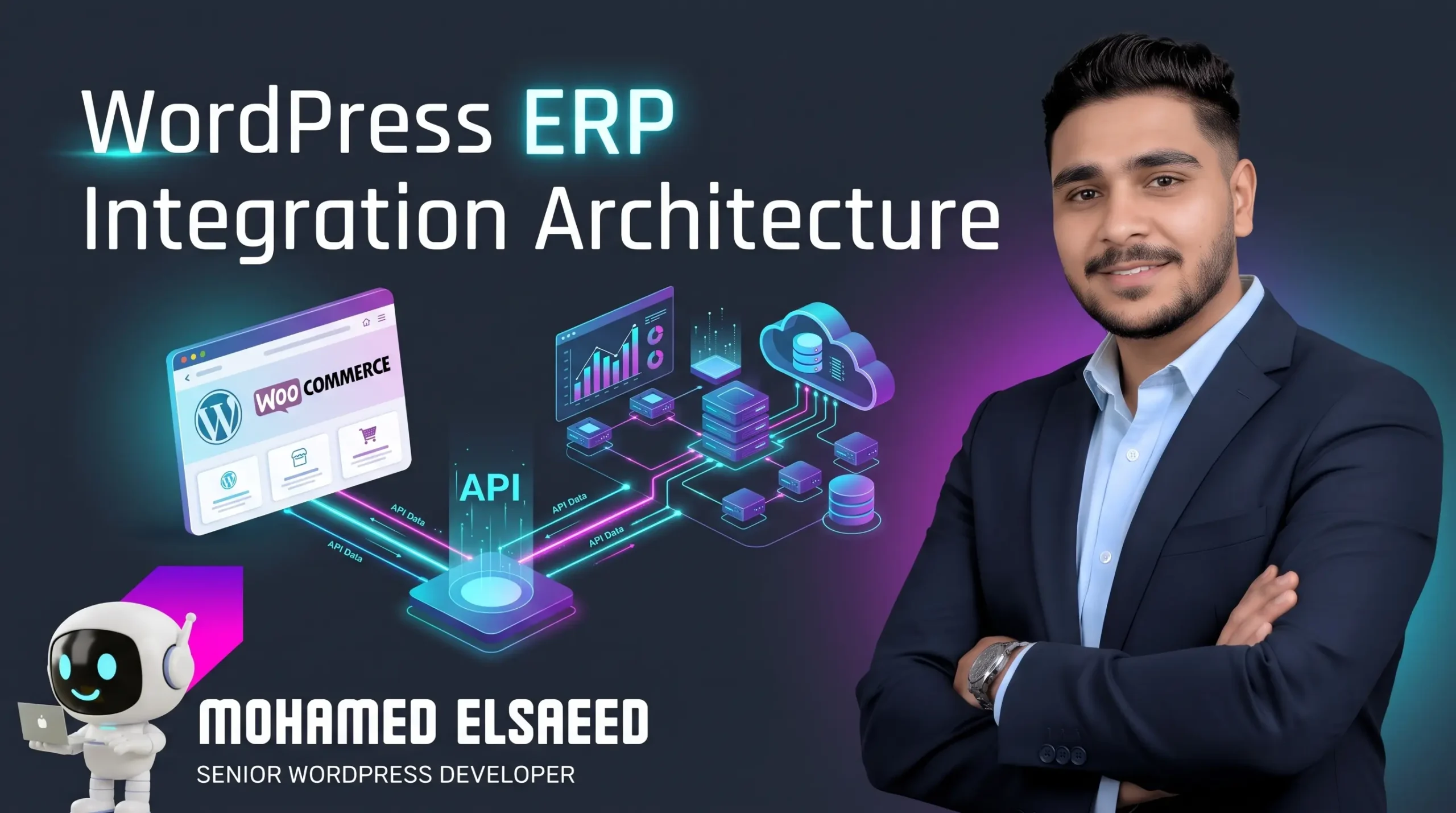
WordPress ERP Integration Architecture: Engineering Scalable, High-Performance Two-Way Data Sync
- Mohamed ElSaeed
- 0 Comments
Scaling an e-commerce store or a high-volume service platform on WordPress eventually exposes a critical operational bottleneck: the disconnect between your customer-facing website and your back-office Enterprise Resource Planning (ERP) system. When order volumes reach hundreds or thousands per day, relying on manual CSV exports, fragmented cron scripts, or poorly coded off-the-shelf connector plugins inevitably leads to inventory discrepancies, delayed fulfillment, and severe database lockups.
True WordPress ERP integration is not merely about getting data from point A to point B; it is an architectural discipline that requires balancing real-time data accuracy with strict frontend performance standards. As Mohamed El-Saeed, a WordPress Developer and UI/UX Designer specializing in performance-focused, scalable, business-driven websites, I have architected and optimized over 150 web projects for more than 300 clients globally. In this comprehensive pillar guide, I will break down the exact engineering patterns we use to integrate WordPress and WooCommerce with enterprise ERPs—such as Odoo, NetSuite, Microsoft Dynamics 365, and SAP Business One—without compromising your Core Web Vitals or server stability.
Why Off-the-Shelf ERP Connector Plugins Fail at Scale
When businesses first decide to connect WooCommerce or WordPress to their ERP, their initial instinct is often to purchase a pre-built $99 connector plugin. While plug-and-play extensions might survive on a starter store with 50 SKUs and a handful of daily orders, they routinely collapse under real-world enterprise conditions.
Through our custom WordPress development services, my team is frequently called in to replace failing third-party connectors due to four structural flaws:
- Synchronous Execution During Checkout: Many generic plugins trigger remote HTTP
POSTrequests to the ERP directly inside the synchronous checkout execution thread. If the ERP endpoint takes 4 seconds to respond—or times out—your customer is left staring at a spinning loader, directly damaging conversion rates and inflating server PHP worker occupancy. - Inability to Handle Custom Data Schemas: Modern B2B and B2C platforms rarely rely on default WooCommerce fields alone. When your architecture utilizes Custom Post Types (CPTs), Advanced Custom Fields (ACF/SCF), tiered B2B pricing matrices, or multi-warehouse routing, rigid plugins fail to map these custom payloads accurately.
- Unthrottled Full-Catalog Polling: Poorly engineered connectors often run bulk cron jobs that re-import the entire product catalog every hour, thrashing the MySQL database and invalidating full-page edge caching across the site.
- Zero Observability or Dead-Letter Handling: When a tax calculation mismatch or a temporary API outage drops an order payload, generic plugins rarely provide structured retry queues or cryptographic idempotency, forcing finance teams to reconcile missing invoices manually.
Choosing Your Integration Topology: Point-to-Point vs. Middleware
Before writing a single line of integration code, a senior architect must define the communication topology. When consulting with clients via Mohamed El-Saeed’s technical profile and about page, we evaluate three primary architectural models based on transaction velocity and system complexity:
1. Custom Asynchronous Point-to-Point (Direct REST API / Webhooks)
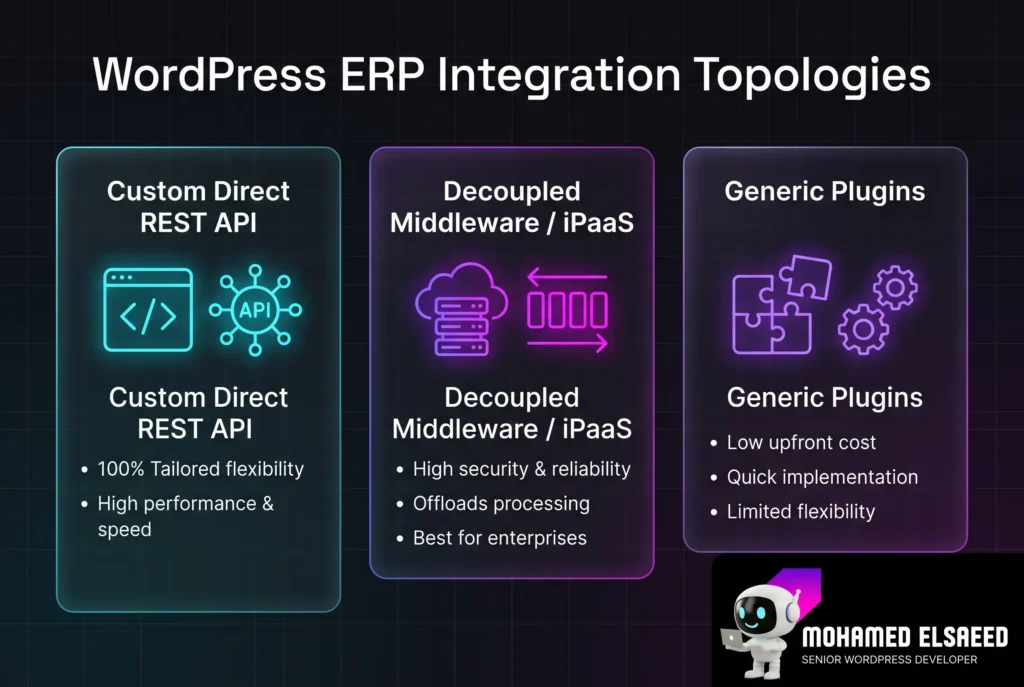
In this architecture, we engineer a bespoke, lightweight WordPress integration plugin tailored exclusively to your business logic. It leverages the native WordPress REST API and WooCommerce REST API, combined with an internal background queueing engine, to communicate directly with your ERP’s endpoints (REST, GraphQL, or JSON-RPC).
- Best suited for: Mid-to-large B2B/B2C stores and custom service portals connecting to a single primary ERP (such as Odoo, Zoho Inventory, or a custom proprietary ERP) where full control over codebase efficiency and zero monthly middleware licensing fees are priorities.
2. Decoupled Middleware / iPaaS Layer
When a business operates an omnichannel ecosystem—connecting WordPress alongside mobile apps, physical retail POS terminals, 3PL fulfillment centers, and legacy ERPs like SAP S/4HANA or Oracle NetSuite—point-to-point wiring becomes difficult to maintain.
- Best suited for: High-velocity enterprise environments. WordPress pushes raw webhook events to an intermediate middleware layer (built on Node.js/Laravel microservices, AWS EventBridge, or an enterprise iPaaS). The middleware handles payload transformation, rate-limit throttling, and multi-system routing completely outside the WordPress server environment.
3. Hybrid Headless / Edge-Cached Data Layer
For high-traffic catalogs with complex real-time customer-specific pricing (e.g., B2B portals where every logged-in corporate buyer sees a different contract price from the ERP), querying the ERP on page load is too slow. Here, we replicate sanitized pricing tiers into custom indexed tables inside WordPress or an edge key-value store (such as Cloudflare KV or Redis), ensuring instant sub-100ms lookups.
| Architectural Dimension | Custom Direct API Plugin | Enterprise Middleware / iPaaS | Generic Off-the-Shelf Connectors |
| Server Resource Overhead | Minimal (lean, purpose-built PHP code) | Near Zero (offloaded to external workers) | High (bloated hooks & unindexed queries) |
| Custom Field & ACF Support | 100% Native & Tailored | 100% Configurable via Data Mappers | Poor (limited to standard meta fields) |
| Failure Recovery & Retries | Custom Exponential Backoff Queues | Enterprise Message Brokers (SQS/RabbitMQ) | Basic or Non-existent |
| Total Cost of Ownership (TCO) | One-time engineering investment | High (ongoing cloud/iPaaS subscriptions) | Low upfront, high maintenance/fix cost |
Defining the Data Contract & Master-Of-Record Hierarchy
A resilient WordPress ERP integration requires a strict contract defining which platform owns which data entity. Allowing both WordPress and the ERP to overwrite the same database fields simultaneously without a designated “Master of Record” guarantees data corruption.
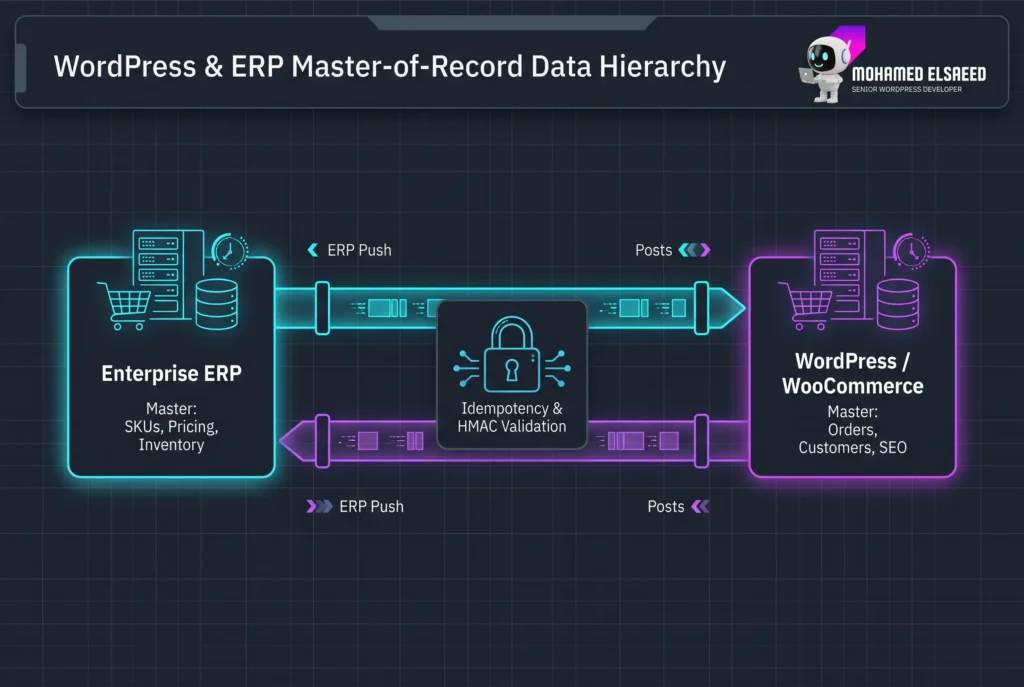
In our scalable WooCommerce development projects, we enforce a strict directional hierarchy:
- Product Catalog & Base Pricing (Master: ERP $\rightarrow$ Replica: WordPress): The ERP controls SKU creation, cost of goods sold (COGS), base pricing, and tax classes. WordPress acts as the presentation and merchandising layer—retaining ownership over SEO metadata, rich media galleries, UI/UX layout components, and marketing descriptions so ERP syncs never overwrite your on-page SEO efforts.
- Inventory & Multi-Warehouse Stock (Master: ERP $\rightarrow$ Replica: WordPress): Stock levels are strictly event-driven from the ERP to WordPress via delta webhooks. Whenever a physical warehouse records a stock movement, only the affected SKU’s quantity is updated in WooCommerce.
- Orders, Payments & Customer Profiles (Master: WordPress $\rightarrow$ Replica: ERP): Once a customer completes a transaction on the frontend, WordPress generates an immutable order record and dispatches the payload—including payment gateway transaction IDs (Stripe, PayPal, regional gateways), tax breakdowns, and shipping metadata—to the ERP for invoicing and fulfillment.
- Fulfillment & Shipment Tracking (Master: ERP $\rightarrow$ Replica: WordPress): When warehouse staff scan and ship the package in the ERP, a webhook updates the WooCommerce order status to
completedand injects the carrier tracking number, triggering transactional customer notifications.
Engineering for Speed: Protecting Core Web Vitals & Database Health
One of the core principles I share regularly with fellow engineers and business owners on Mohamed El-Saeed’s LinkedIn profile is that backend complexity must never penalize frontend user experience. Google’s Core Web Vitals standards—specifically Time to First Byte (TTFB) and Interaction to Next Paint (INP)—will degrade rapidly if your ERP integration starves the server of CPU cycles or locks database rows.
Through our WordPress performance and speed optimization services, we implement four mandatory engineering safeguards:
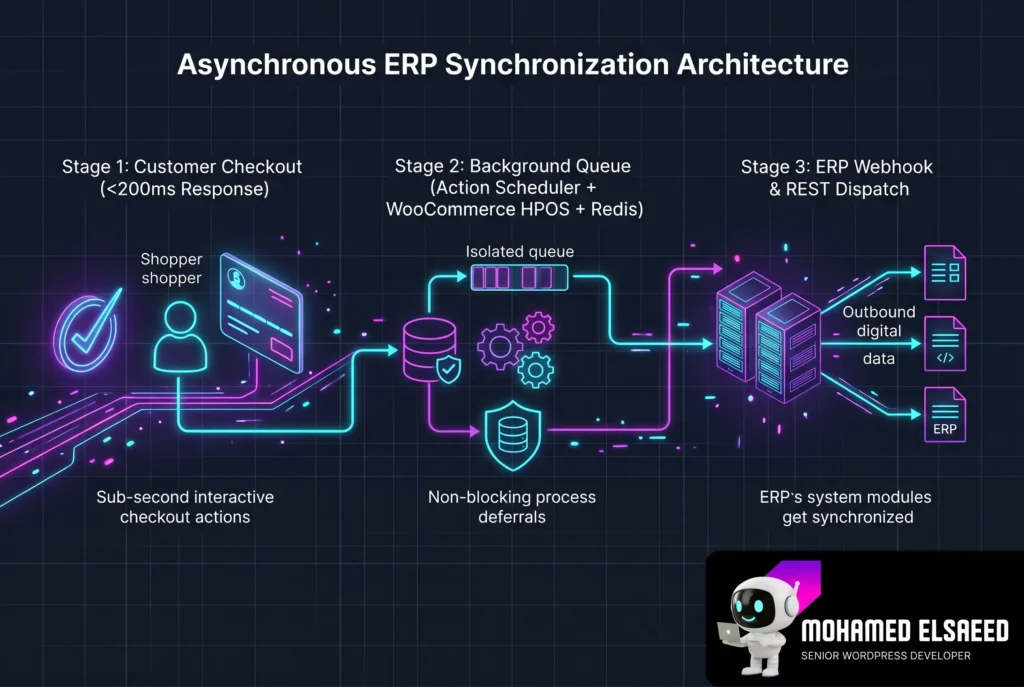
1. Decoupled Background Processing with Action Scheduler
Never execute external cURL requests inside user-facing HTTP requests. When an order is placed (woocommerce_checkout_order_processed), we immediately return the confirmation screen to the user while enqueuing an asynchronous background job via Action Scheduler. Action Scheduler processes ERP dispatches in controlled batches via background workers, complete with built-in logging and failure isolation. For a deeper dive into this setup, read our supporting technical breakdown on scaling WooCommerce with HPOS and Action Scheduler.
2. Mandatory High-Performance Order Storage (HPOS)
Legacy WooCommerce installations store orders inside the wp_posts and wp_postmeta tables. Running high-frequency ERP synchronization against wp_postmeta creates massive SQL join overhead that slows down the entire website. We migrate and configure all ERP-connected stores to use WooCommerce High-Performance Order Storage (HPOS), isolating order data into dedicated, flat, indexed database tables (wp_wc_orders) designed for high-throughput CRUD operations.
3. Targeted Cache Invalidation (Surgical Purging)
When an ERP updates the stock or price of 15 specific products, poorly configured integrations trigger a global cache purge (purge_all), wiping out your LiteSpeed, Nginx FastCGI, or Cloudflare edge cache across thousands of unrelated pages. We engineer surgical cache hooks that purge only the specific Product ID URL and its immediate parent category archive, keeping your global cache hit ratio above 95%.
4. OS-Level Cron & Redis Object Caching
Relying on WordPress’s native wp-cron.php means background sync tasks are triggered by random frontend visitors, adding latency to their requests and failing during low-traffic hours. We disable native WP-Cron (define('DISABLE_WP_CRON', true);) and bind batch workers to true Linux system crons or WP-CLI daemons, backed by persistent Redis Object Caching to keep API authentication tokens and SKU mapping tables in memory.
Beyond E-Commerce: ERP & CRM Integration for Real Estate, LMS, and Service Portals
While WooCommerce dominates retail integration discussions, a significant portion of the systems showcased in Mohamed El-Saeed’s project portfolio involves non-eCommerce enterprise platforms:
- Real Estate Developer Portals: Using Custom Post Types (CPTs) and ACF Pro, we connect large property portals directly to real estate ERPs (such as Yardi, Propertyfinder APIs, or custom Odoo Real Estate modules). Unit availability, floor plans, dynamic installment calculators, and lead capture forms sync bi-directionally in real time. Explore our architectural case study on building custom real estate CRM and ERP integrations in WordPress.
- Educational Platforms (LMS) & Corporate Training: Connecting LearnDash or custom LMS architectures with corporate HR/ERP systems to automate employee seat provisioning, compliance certification tracking, and B2B corporate billing.
- B2B Service & RFQ Portals: Routing complex multi-step quote requests (built with Fluent Forms or custom React blocks) directly into ERP sales pipelines and automated estimation modules.
Security, Idempotency & Fault Tolerance Checklist
Connecting your public web server to your internal financial software requires bank-grade security protocols. As I often highlight in my technical reels and architectural breakdowns on Mohamed El-Saeed’s Instagram and Facebook page, every production integration must enforce:
- Cryptographic Idempotency Keys: Network blips happen. If WordPress sends an order payload to NetSuite or Odoo and the connection drops before the
200 OKresponse is received, the retry queue will send the order again. By embedding a deterministicIdempotency-Keyheader (e.g., a hash of the Order ID and timestamp), the ERP recognizes duplicate transmissions and prevents double-billing or double-deducting inventory. - Webhook HMAC Signature Verification: Incoming webhook endpoints on your WordPress site must never be publicly executable without cryptographic validation. We enforce
HMAC-SHA256payload signature checks alongside strict IP whitelisting and rate-limiting rules via Cloudflare WAF. - Exponential Backoff & Alerting: If the ERP server undergoes scheduled maintenance, the WordPress queue automatically pauses and retries using an exponential backoff schedule ($2^n$ minutes), alerting the engineering team via Slack or email only if a payload fails consecutively beyond the threshold.
9. FAQ (Frequently Asked Questions)
Does integrating an ERP with WordPress negatively impact Technical SEO?
When architected asynchronously, an ERP integration actually strengthens your Technical SEO. By decoupling API calls from the frontend rendering path, your TTFB and INP metrics remain fast. Furthermore, automated real-time stock updates prevent customers and search crawlers from landing on broken 404 pages, while structured schema markup (Product availability and pricing) stays 100% accurate for Google Merchant Center and organic rich snippets.
Can we keep using Elementor Pro with a custom ERP integration?
Yes. A properly engineered ERP integration operates entirely within the backend data and application layer. As long as your Elementor Pro templates dynamically pull data from standard WordPress post meta, ACF fields, and WooCommerce hooks, your UI/UX design remains completely decoupled from the underlying API synchronization logic.
How long does a custom WordPress to ERP integration take to build and deploy?
For a standard bi-directional integration covering products, inventory, customers, and orders with an established ERP (like Odoo, Zoho, or Dynamics 365), architecture design, custom plugin development, staging sandbox testing, and deployment typically take between 3 to 6 weeks depending on the complexity of your custom business rules.
What happens if our SKU structure in WooCommerce doesn’t match our ERP?
Data sanitization is always Step 1 before activation. Either the SKU identifiers must be standardized across both systems, or we build a dedicated lookup translation table inside WordPress that maps your internal ERP Item_ID to the corresponding WooCommerce Product_ID and Variation_ID.
10. CTA (Conclusion & Consultation)
Treating your WordPress website and your ERP as two isolated islands is one of the most expensive hidden costs in a growing business. By investing in a clean, asynchronous, and fault-tolerant integration architecture, you eliminate manual operational bottlenecks while preserving the blistering frontend speed and UI/UX quality that drive conversions.
If you’re planning a new WordPress website, scaling a high-volume WooCommerce store, or looking to rescue an unstable ERP integration, you can work with Mohamed El-Saeed to architect a scalable, performance-focused solution. Reach out through Mohamed El-Saeed’s contact and consultation page to schedule a technical discovery call, or discuss your project with me on WhatsApp directly.




Leave A Comment