

03 October
Web Development
Custom Web Development vs WordPress: Which Is Right for Your Business in 2026?
- Mohamed ElSaeed
- 0 Comments
Choosing between custom web development vs WordPress is not really a question of which technology is “better.” It is a question of which architecture makes the most sense for the website, application, team, budget, maintenance model, and future growth of a specific project.

A company website with service pages and a blog has very different technical requirements from a SaaS platform, an internal operations system, a real estate portal, or a highly customized marketplace.
That distinction matters because both extremes can lead to poor decisions. Building everything from scratch can add unnecessary development and maintenance work to a straightforward business website. At the same time, forcing WordPress into a role that does not fit the underlying product can create technical complexity that becomes expensive later.
WordPress is also frequently misunderstood in this comparison. It is not simply a no-code website builder. Its official developer platform supports custom themes, plugins, APIs, command-line tools, custom functionality, and deeper application development. WordPress Developer Resources
The right way to compare the two is therefore not “coding versus WordPress.”
It is:
Should you build your project on an established content management and application platform, or does the project justify its own custom architecture?
That is the question this guide will answer.
What Is Custom Web Development?
Custom web development means designing and engineering a website or web application around a project’s specific technical requirements rather than relying primarily on the predefined architecture of a CMS.
A custom development stack may include HTML and CSS for structure and presentation, JavaScript or a JavaScript framework for front-end interaction, a server-side technology such as PHP, Node.js, Python, Java, or another platform, and a database appropriate for the application.
It may also include authentication services, APIs, background processing, search infrastructure, caching, queues, cloud services, and external integrations.
However, “custom development” does not mean writing every component from zero.
Professional developers still use frameworks, libraries, packages, APIs, databases, cloud platforms, and established development patterns. The custom part is primarily the application architecture and business logic built around the project’s requirements.
For example, a specialized logistics application may have custom workflows for drivers, dispatchers, customers, pricing rules, delivery status, notifications, reporting, and third-party integrations.
In that case, the software itself is part of the company’s operational system.
That is a very different project from a corporate website whose primary purpose is presenting services, generating leads, publishing content, and allowing a marketing team to update pages.
What Is WordPress Development?
WordPress development means using WordPress as the foundation of the website while extending and customizing it according to the project requirements.
That can include considerably more than installing a theme.
Professional WordPress development can involve custom themes, custom plugins, custom post types, taxonomies, custom fields, dynamic templates, user permissions, custom database interactions, integrations, REST APIs, WooCommerce development, multilingual functionality, and custom application logic.
The official WordPress Developer Resources include dedicated documentation for themes, plugins, common APIs, the Block Editor, REST API, WP-CLI, and coding standards. WordPress Developer Resources
This is why WordPress should not automatically be classified as the “non-coding option.”
There is an important difference between using WordPress and developing with WordPress.
A simple website may be created almost entirely through existing themes and visual tools. A more advanced implementation may combine WordPress with PHP, JavaScript, CSS, custom plugins, APIs, ACF-style data structures, custom post types, WooCommerce logic, and external systems.
As a WordPress developer, I generally treat the platform as an architectural starting point. The objective is not to use the maximum number of plugins, but to use the capabilities already available in WordPress and develop custom functionality where the project actually needs it.
You can see this approach across different types of projects in my WordPress web design and development portfolio.
Custom Web Development vs WordPress: The Main Difference
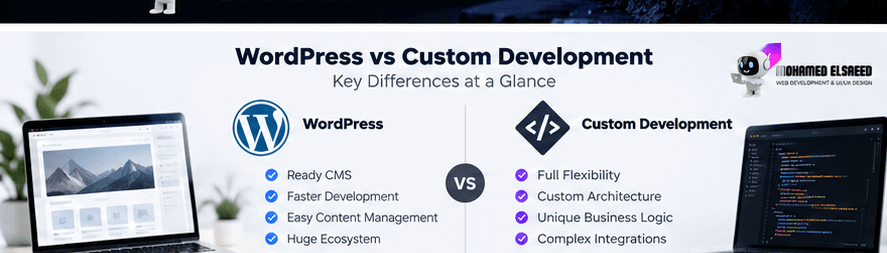
The biggest difference is the amount of infrastructure you already have before project-specific development begins.
WordPress gives developers an established system for content management, users, roles, media, themes, plugins, URLs, editorial workflows, extensions, APIs, and administration.
With a fully custom application, the team decides which of those systems need to exist and how they should be implemented.
That difference can significantly affect development time, budget, maintenance, flexibility, and technical responsibility.
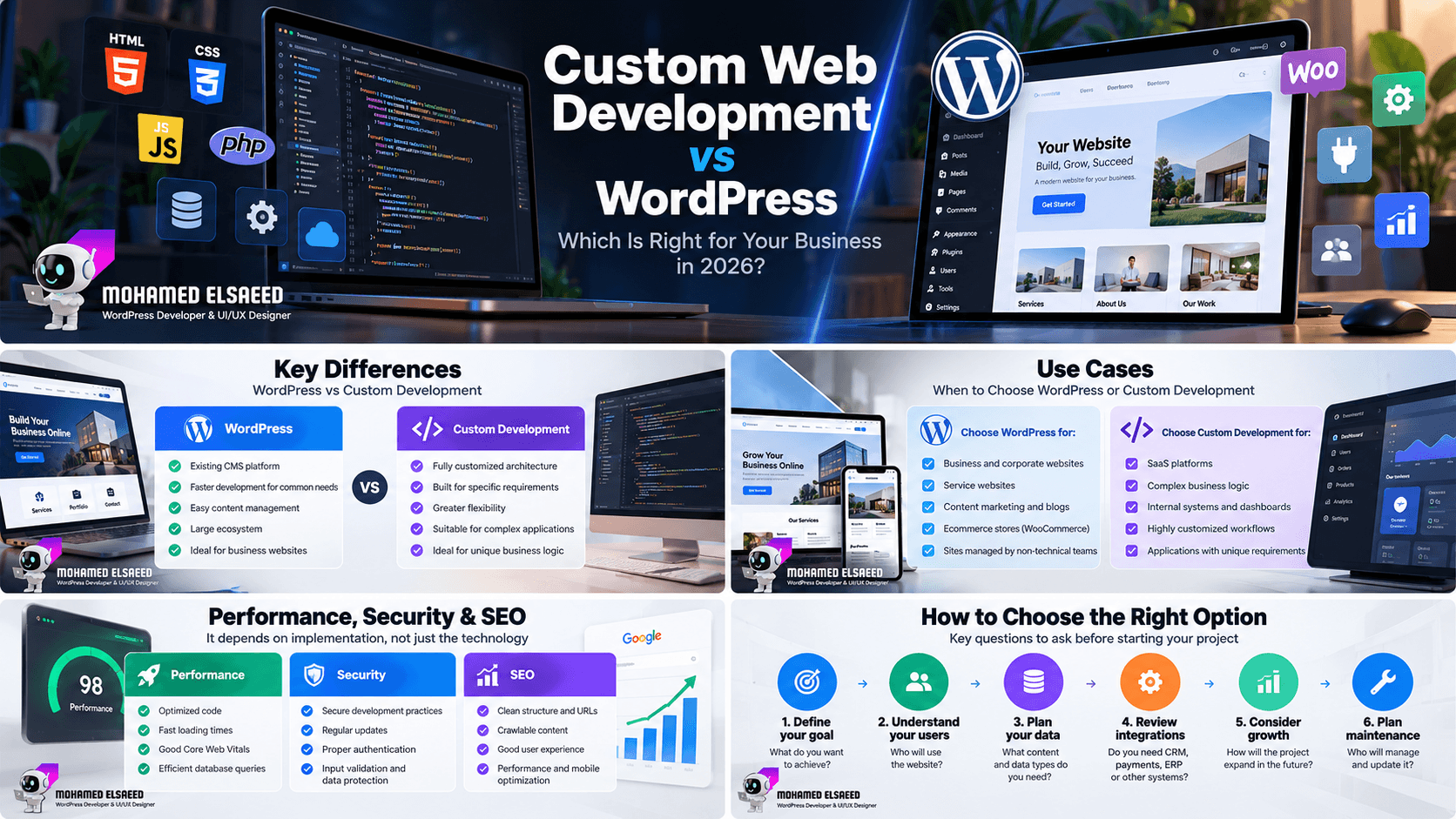
| Area | WordPress Development | Custom Web Development |
|---|---|---|
| Starting point | Existing CMS and development platform | Architecture defined for the project |
| Content management | Built in | Must be built or integrated |
| Development speed | Often faster for common website requirements | Usually more development work initially |
| Customization | High with professional development | Potentially unrestricted |
| Unique business logic | Possible, but suitability depends on complexity | Designed specifically for it |
| Administration | Mature dashboard already available | Must be designed or integrated |
| APIs | Built-in APIs plus custom endpoints | Designed around the application |
| Maintenance | Core, plugin, theme and custom-code maintenance | Full stack maintained by the development team |
| Best fit | Business sites, content, ecommerce and many dynamic websites | Specialized applications and unusual workflows |
Neither column represents “good” or “bad.”
The question is how much of the system your project genuinely needs to reinvent.
When WordPress Is the Better Choice
WordPress is particularly effective when content, marketing, website management, and business presentation are central to the project.
Business and Corporate Websites
A typical business website may need a homepage, service pages, company information, portfolios, case studies, landing pages, contact forms, team profiles, multilingual content, and a blog.
WordPress already provides much of the foundation required to manage this content.
Building a completely new CMS simply to reproduce these functions can create development work without creating equivalent business value.
For this type of project, I usually prefer to spend more development effort on the areas that users actually experience: information architecture, UI/UX, performance, responsive design, conversion paths, structured content, SEO foundations, and custom business functionality.
You can see how I approach these requirements in my WordPress development service.
Content-Driven Websites
WordPress is particularly strong when publishing is a significant part of the business strategy.
Articles, resources, landing pages, categories, authors, media, custom content types, and internal linking can all be managed through an established editorial environment.
This makes the platform useful for companies investing in SEO and long-term content marketing because the marketing team can manage content without requiring a developer for every update.
The technology itself does not produce SEO results, of course. Google recommends creating helpful, reliable content for people rather than building pages primarily to manipulate search rankings.
The CMS simply determines how efficiently a team can build, organize, maintain, and improve that content.
Ecommerce Websites
For many conventional ecommerce projects, WordPress combined with WooCommerce provides an established foundation for products, categories, orders, checkout, payments, shipping, coupons, customer accounts, and extensions.
That can remove a large amount of infrastructure that would otherwise have to be engineered separately.
I cover this process in more depth in my WooCommerce setup guide.
This does not mean WooCommerce is automatically right for every ecommerce business.
If the project has extremely unusual marketplace logic, complex inventory systems, high-frequency transactional operations, or workflows far beyond a conventional store, the architecture should be evaluated independently.
Websites Managed by Marketing Teams
This is an underestimated consideration.
A website is not used only by visitors.
Editors, marketers, sales teams, SEO specialists, and business owners may need to manage it every week.
A technically elegant website can still become operationally expensive if changing a headline, creating a landing page, publishing a case study, or updating a service requires a developer every time.
WordPress often performs well in this environment because content management is already part of the system.
When Custom Web Development Is the Better Choice
Custom development becomes more compelling when the software itself is the product or when the application’s requirements are significantly different from those of a content management system.
Complex SaaS Applications
Consider a SaaS platform in which users create workspaces, collaborate, process large datasets, manage subscriptions, trigger automated workflows, communicate in real time, and use deeply interconnected application features.
The project’s core value is not content publishing.
Its core value is application behavior.
In such a case, a purpose-built application architecture may provide a cleaner foundation.
Highly Specialized Business Logic
Some systems depend on complex rules that determine pricing, permissions, scheduling, inventory, resource allocation, approvals, financial operations, or multi-step business workflows.
WordPress can be extended substantially, but the important question is not whether developers can implement something in WordPress.
The better question is:
Does WordPress reduce complexity for this project, or would we spend most of the development effort working around the platform?
When the second situation becomes true, custom architecture deserves serious consideration.
Internal Business Applications
ERP-related tools, operational dashboards, logistics systems, workflow applications, custom CRMs, and other internal systems may have data relationships and processes that have little connection to traditional content management.
A custom back end can make more sense when the application’s data model and operational logic are the dominant technical requirements.
Products With Unusual Infrastructure Requirements
Some projects need architectures built around queues, real-time events, independent services, specialized search infrastructure, high-volume processing, or other requirements that go beyond a conventional website.
These are not requirements most business websites have.
Architecture should reflect actual needs rather than hypothetical scale.
WordPress and Custom Development Can Work Together
One of the biggest mistakes in this comparison is treating the two options as mutually exclusive.
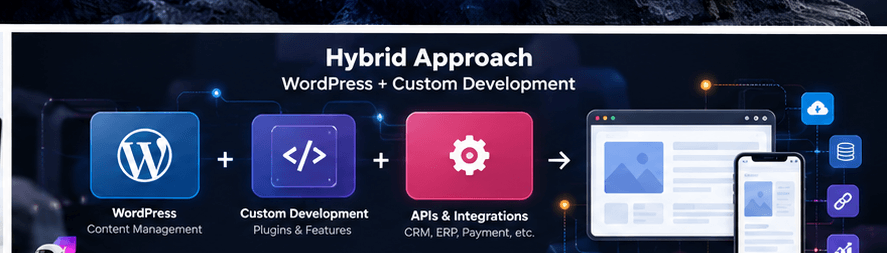
In many real projects, the best architecture is hybrid.
A website might use WordPress for content management while a custom plugin controls specialized functionality.
A business might use WordPress as the public-facing website while connecting it to a CRM or ERP through APIs.
A real estate website might use WordPress for pages and content while custom post types, taxonomies, fields, search logic, and integrations power the property database.
An ecommerce store might use WooCommerce as its commerce foundation while custom development handles pricing rules, external inventory, shipping logic, or business-specific workflows.
WordPress includes a REST API specifically for allowing applications to interact with site data through JSON. The official documentation notes that it can support custom interfaces, alternative dashboards, interactive front ends, and separate applications connected to WordPress content. WordPress Developer Resources
That makes architectures such as:
WordPress + Custom Plugin + External API
or:
WordPress CMS + Separate Front End
entirely possible.
What About Headless WordPress?
Headless WordPress separates content management from the presentation layer.
WordPress remains responsible for managing content, while another front-end application retrieves that content through an API and renders the user-facing experience.
The official WordPress REST API documentation specifically supports using WordPress content in separate applications and custom interfaces. WordPress Developer Resources
Headless architecture can make sense when a project needs the same content across multiple applications, has specific front-end requirements, or already operates within a JavaScript application ecosystem.
However, it should not be treated as an automatic upgrade.
You are introducing another application layer that must be developed, deployed, cached, secured, monitored, and maintained.
For an ordinary business website, traditional WordPress architecture may be simpler and more efficient.
Complexity should solve a problem.
It should not be the goal.
Is Custom Development Faster Than WordPress?
There are two different meanings of “faster.”
The first is faster to build.
For common website requirements, WordPress will often reduce development time because many fundamental systems already exist.
The second is faster for the user.
Here, the answer depends much more on implementation quality.
A custom-built website can perform poorly if it ships excessive JavaScript, inefficient queries, oversized media, blocking resources, or a badly designed rendering architecture.
A WordPress site can also perform poorly when overloaded with unnecessary plugins, heavy themes, oversized images, poorly optimized scripts, inefficient database queries, or weak hosting.
MDN describes web performance as a combination of rendering, resources, JavaScript, CSS, media, network behavior, and other implementation decisions rather than something determined by the CMS name alone. MDN Web Docs
For WordPress-specific performance work, you can also read my guide to the best WordPress speed optimization plugins for 2026 and my WordPress hosting guide.
Performance Should Be an Architecture Decision
Performance optimization should not begin after development is finished.
A developer should already be asking during implementation:
Does this script need to load on every page?
Does this interaction justify an additional JavaScript library?
Can this content be cached?
Is the database query appropriate for the amount of data?
Are image dimensions and formats suitable?
Is the DOM unnecessarily complex?
What resources are required before the primary content can render?
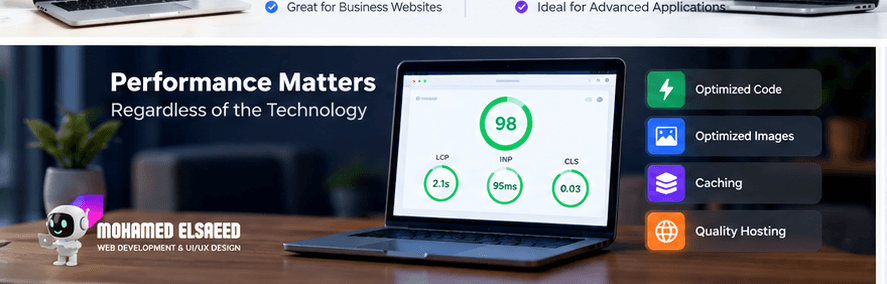
Google’s current Core Web Vitals focus on three dimensions of real-world experience: loading through Largest Contentful Paint, responsiveness through Interaction to Next Paint, and visual stability through Cumulative Layout Shift.
The current “good” thresholds are LCP of 2.5 seconds or less, INP of 200 milliseconds or less, and CLS of 0.1 or less, evaluated at the 75th percentile. web.dev
These metrics apply regardless of whether the site was built using WordPress, Laravel, React, Next.js, PHP, or another technology.
Is Custom Code More Secure Than WordPress?
Not automatically.
Custom software eliminates some risks associated with third-party extensions, but it also makes the development team responsible for a larger portion of the security implementation.
Authentication, authorization, input validation, output escaping, session handling, file uploads, database interactions, APIs, dependencies, and infrastructure all need to be handled correctly.
Likewise, WordPress security depends heavily on implementation quality, maintenance, extension quality, access control, hosting, and update practices.
The official WordPress security guidance emphasizes validating and sanitizing incoming data, escaping output, relying on the platform’s security APIs where appropriate, and keeping code maintained. WordPress Developer Resources
So the real comparison is not:
Custom = secure, WordPress = insecure.
It is:
How well is this particular system designed, developed, maintained, and monitored?
Does WordPress Become Slow Because of Plugins?
Plugin count alone is not a useful performance measurement.
Twenty small, well-designed plugins may have less impact than one poorly designed plugin that performs expensive database queries or loads large JavaScript bundles across every page.
A better technical review asks what each plugin does, how often its functionality executes, what files it loads, whether it creates database queries, whether its features overlap with other plugins, and whether a small amount of custom development could replace unnecessary complexity.
WordPress itself is intentionally extensible through plugins, and its official Plugin Developer Handbook covers hooks, metadata, custom post types, taxonomies, users, security, settings, and other mechanisms for extending the system. WordPress Developer Resources
The objective should therefore be controlled architecture, not an arbitrary plugin-count target.
Custom Web Development vs WordPress for Scalability
Scalability is another term that is frequently reduced to a single question:
“How many visitors can it handle?”
Traffic matters, but it is only one dimension.
A website may need to scale its content from 100 pages to 100,000 records.
A store may grow from a small catalog into thousands of products and integrations.
A company may add multiple editors and permission levels.
A service platform may expand into multiple markets and languages.
An application may gain workflows that did not exist in the original version.
Therefore, scalability should be considered across data, functionality, infrastructure, users, administration, and development processes.
The right question is not simply:
Will the site grow?
It is:
What specifically is expected to grow, and how should the architecture respond when it does?
WordPress vs Custom Development for SEO
Google does not rank websites because they use WordPress, and it does not provide a ranking bonus simply because a website was custom-coded.
Search engines interact with the final website.
That means developers should focus on whether the architecture allows search engines and users to access the right content efficiently.
Technical considerations include crawlable content, internal linking, canonicalization, redirect handling, status codes, mobile usability, structured data where appropriate, page performance, metadata, URL management, and avoiding unnecessary duplicate pages.
Page experience is relevant, but Google explicitly states that there is no single “page experience signal” and that even good Core Web Vitals do not guarantee top rankings. Google for Developers
Architecture provides the foundation; SEO strategy still requires content, search-intent alignment, information architecture, on-page optimization, authority, and ongoing analysis.
If organic visibility is an important part of your project, my SEO services combine technical SEO, site structure, content optimization, and performance rather than treating SEO as a plugin installed after development.
Maintainability Is Often More Important Than Initial Development
A website is rarely finished when it launches.
It will be updated.
New pages will be added.
Marketing campaigns will change.
Dependencies will receive updates.
Browsers and APIs will evolve.
Business requirements will change.
This means maintainability should influence the technology decision from the beginning.
WordPress has established conventions and a large ecosystem, but a poorly structured WordPress project can still become difficult to maintain.
Custom applications provide architectural freedom, but that freedom also means the development team must create and document its own conventions.
The WordPress Coding Standards are designed to improve code readability, reduce common errors, and make code easier for other developers to understand and modify. WordPress Developer Resources
The same general principle applies beyond WordPress:
Good architecture should make tomorrow’s change easier, not only make today’s feature work.
What About Elementor and Page Builders?
Using a visual builder does not mean all development disappears.
Elementor can be effective for the presentation layer of many WordPress business websites, particularly when the project benefits from editable layouts.
But the page builder should not determine the entire architecture.
I often separate the visual layer from structured content.
For example, instead of manually creating dozens of property pages with duplicated layouts, a real estate project can store properties as a structured custom content type with dedicated fields and taxonomies, then render that information dynamically through templates.
The front-end editing tool handles presentation.
The content architecture handles data.
That distinction becomes increasingly important as a website grows.
WordPress Development Is Not the Same as Installing a Theme
This distinction is especially important for business owners comparing proposals.
Two projects described as “WordPress websites” may be technically very different.
One may be a pre-built theme with demo content replaced.
Another may include custom UI/UX, structured content models, dynamic templates, custom functions, integrations, performance optimization, multilingual architecture, security configuration, SEO foundations, and post-launch maintenance.
The CMS name alone tells you very little about implementation quality.
From my experience building WordPress websites across business, service, ecommerce, education, and multilingual projects, the strongest implementations normally come from understanding the business first and selecting the WordPress components around those requirements—not the other way around.
You can learn more about my background as a WordPress Developer and UI/UX Designer.
How to Choose the Right Technology for Your Project
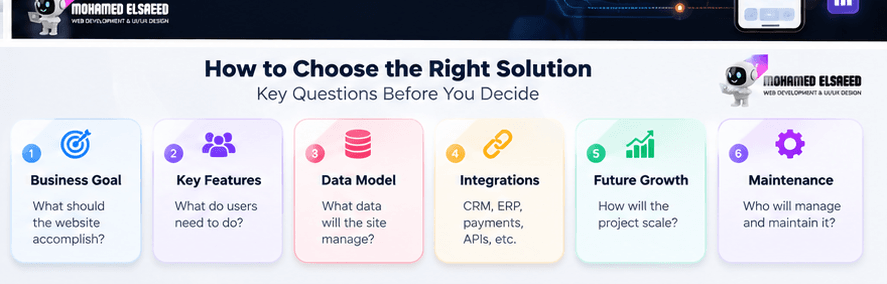
The decision becomes much easier when you stop comparing technologies in isolation and start documenting the project.
Start With the Business Goal
What is the website expected to accomplish?
A lead-generation site, ecommerce store, internal system, marketplace, SaaS platform, learning platform, and publishing website require very different architectures.
Define the Core User Actions
What must a user actually be able to do?
Read content?
Submit a lead?
Purchase products?
Manage projects?
Generate reports?
Collaborate in real time?
Manage complicated workflows?
The more the product moves away from content and conventional web interactions toward unique software behavior, the more important custom architecture becomes.
Define the Data Model
What kinds of data exist?
How are they related?
How much data is expected?
Who can create, view, edit, and delete it?
Poor data architecture is one of the reasons websites become difficult to expand later.
Review Required Integrations
A project may need payment gateways, CRM, ERP, email services, shipping providers, accounting platforms, analytics, mobile apps, or external APIs.
WordPress supports API-based integrations, and its REST API can expose or manage a wide range of content and application data. WordPress Developer Resources
But complex integrations should still be evaluated individually.
Consider the People Who Will Maintain It
A sophisticated technology stack is not automatically a good business decision if the company cannot maintain it.
Ask who will update content, who will maintain code, how easily another developer could take over, what skills the team possesses, and what ongoing technical resources are available.
Model Future Growth Realistically
Do not design an enterprise architecture because the project might one day have millions of users.
Equally, do not create an architecture that clearly cannot accommodate known future requirements.
Design for realistic growth while preserving a path to evolve.
So, Should You Choose WordPress or Custom Web Development?
For a business website, corporate site, service website, content platform, portfolio, conventional WooCommerce store, many learning websites, and a large range of marketing-focused projects, professional WordPress development can provide an excellent balance of flexibility, content management, development speed, extensibility, and long-term usability.
When the website becomes a highly specialized software product—with unique workflows, complex domain logic, unusual infrastructure, or deeply customized application behavior—a purpose-built architecture may be the better foundation.
And many projects fall somewhere between those two positions.
WordPress can manage content while custom code handles specialized functionality.
WooCommerce can provide ecommerce infrastructure while custom integrations connect it to business systems.
Custom plugins can extend WordPress without trying to replace everything the platform already does well.
The objective is not to choose the technology that sounds most advanced.
It is to choose the simplest architecture that satisfies the project’s real requirements without creating unnecessary limitations later.
Frequently Asked Questions About Custom Web Development vs WordPress
Is custom web development better than WordPress?
Not universally. Custom development offers greater architectural freedom, while WordPress provides an established CMS and development ecosystem. The better option depends on the project’s functionality, content requirements, maintenance model, integrations, and expected growth.
Is WordPress considered real web development?
Yes. Advanced WordPress development can involve PHP, JavaScript, CSS, custom plugins, APIs, database interactions, custom content structures, and application logic. WordPress provides official developer documentation for these areas. WordPress Developer Resources
Is a custom-coded website faster than WordPress?
Not automatically. Performance depends on architecture, front-end resources, JavaScript, database efficiency, caching, hosting, media, third-party integrations, and implementation quality. MDN Web Docs
Can WordPress handle custom functionality?
Yes. Developers can build custom plugins, post types, fields, integrations, REST API endpoints, dashboards, workflows, and other features. The more specialized the functionality becomes, however, the more important it is to assess whether WordPress remains the right architectural foundation.
Is WordPress suitable for large websites?
It can be, but “large” is not a sufficient technical requirement. A project should be assessed by data volume, traffic patterns, functionality, integrations, content architecture, database workload, team requirements, and infrastructure.
Can WordPress connect to ERP or CRM systems?
Yes, when the external system provides an appropriate integration method. WordPress can make HTTP requests and expose REST APIs, allowing developers to build custom integrations with external platforms. WordPress Developer Resources
Is headless WordPress better than traditional WordPress?
Not by default. Headless WordPress can be useful for particular application architectures, but it introduces an additional front-end layer and operational complexity. It should be chosen when those tradeoffs solve a real project requirement.
Is WordPress good for SEO?
WordPress provides a useful content-management foundation, but using WordPress does not automatically improve rankings. SEO still depends on content quality, crawlability, site structure, search intent, technical implementation, performance, links, and many other factors.
Build the Architecture Around the Project, Not the Technology
The most expensive technology mistake is often choosing the stack before understanding the project.
Start with business goals, users, data, functions, integrations, content management, performance requirements, maintenance, and expected growth.
Then choose the architecture.
That may result in a fully customized application.
It may result in a professional WordPress website.
Or it may result in WordPress combined with carefully selected custom development.
If you are planning a new website and are not sure whether your project needs WordPress, custom development, or a hybrid architecture, you can explore my WordPress development projects and WordPress development services, or discuss your project with me on WhatsApp.


Leave A Comment